

For merchants who create payments directly, some extra work is required in order to support 3DS. If you are creating payments directly, please read on.
Creating 3DS Payments Directly: Secure Tokens API
The flow of Secure Token API is similar to our existing Tokens API. The difference is that your system needs to navigate customers to an authentication_url in order to activate the token.
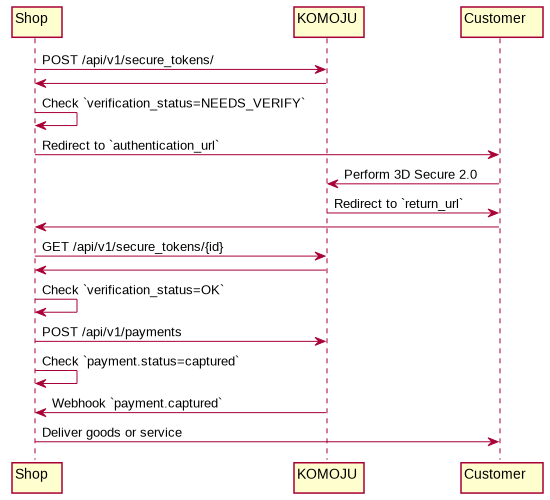
1. Generate Secure Token
First, call POST /api/v1/secure_tokens API with credit card payment details. The response includes Secure Token information.
Request
curl -X POST https://komoju.com/api/v1/secure_tokens \
    -u sk_12345: \
    -d "amount=1000" \
    -d "currency=JPY" \
    -d "return_url=https://example.com/complete" \
    -d "payment_details[type]=credit_card" \
    -d "payment_details[email]=test@example.com" \
    -d "payment_details[number]=4100000000000100" \
    -d "payment_details[month]=08" \
    -d "payment_details[year]=2025" \
    -d "payment_details[verification_value]=123" \
    -d "payment_details[name]=Test Card"
Response
{
  "secure_token": "tok_1234567890abcdefghijklmnop",
  "verification_status": "NEEDS_VERIFY",
  "authentication_url": "https://komoju.com/three_d_secure_service/offsite?token=tok_1234567890abcdefghijklmnop"
}| Request Parameter | Type | Description |
|---|---|---|
amount | numeric | Payment amount |
currency | string | 3 letter currency code |
return_url | string | URL where customer will be redirected to after payment completion |
payment_details[type] | string | "credit_card" |
payment_details[email] | string | Customer's email address |
payment_details[number] | numeric | Credit card number |
payment_details[month] | numeric | Credit card expiry month |
payment_details[year] | numeric | Credit card expiry year |
payment_details[verification_value] | numeric | "CVV" code on back of card |
payment_details[name] | string | Cardholder name |
| Response Parameter | Type | Description |
|---|---|---|
id | string | Token ID - you'll want to save this |
verification_status | string | OK, NEEDS_VERIFY, SKIPPED, or ERRORED |
authentication_url | string | URL to send the customer to authenticate with their card issuer |
Please skip Step 2 and 3 when the verification_status is OK or SKIPPED.
When the verification_status is ERRORED, 3D Secure 2.0 authentication failed to initialize and the Secure Token is unable to be used. Please check the payment_details and retry the request.
2. Redirect to authentication_url
Please redirect customers to authentication_url when the verification_status is NEEDS_VERIFY so that customers can perform 3D Secure 2.0 authentication.
3. Request the authentication result
Customers are redirected to return_url sent with POST /api/v1/secure_tokens. KOMOJU adds secure_token_id=[secure token id] to its HTTP parameters.
After your system received the redirection to redirect_url, you can call GET api/v1/secure_tokens/:id to get the authentication result.
When the verification_status is ERRORED, 3D Secure 2.0 authentication failed to initialize and the Secure Token is unable to be used. Please check the payment_details and retry the request or ask customers to use another credit card.
Request
curl -X GET https://komoju.com/api/v1/secure_tokens/tok_1234567890abcdefghijklmnop \
    -u sk_12345:
Response
{
  "secure_token": "tok_1234567890abcdefghijklmnop",
  "verification_status": "OK"
}
4. Call POST /api/v1/payments to process payment
Finally you can request POST /api/v1/payments by using Secure Token when verification_status is OK or SKIPPED.
Note, SKIPPED status means authentication was skipped because of a system error such as connection error with the 3D Secure 2.0 authentication server. In this case, you may continue processing the payment or retry authentication.
The sum of amount and tax should be equal to the amount value given from the initial Secure Token API request. Omitting tax means tax=auto so tax will be calculated automatically. So we recommend using tax=0.
curl -X POST https://komoju.com/api/v1/payments \
  -u sk_12345: \
  -d "amount=1000" \
  -d "tax=0" \
  -d "currency=JPY" \
  -d "payment_details=tok_1234567890abcdefghijklmnop"
Test Cards
Please use the test cards mentioned in Testing Payments with 3D Secure (3DS) in order to test Secure Token in test mode.
Raw Result Data
For merchants who implement their own anti-fraud systems, or want to investigate unexpected errors, we expose a handful of raw data from the 3DS server.
If you use your secret key to fetch a secure token, it will include a field called three_ds_auth_result.
Authentication status and failure reasons
For API versions 2024-07-15 and 2025-01-28, the following optional fields help you distinguish authentication flows and investigate failures:
| Field | Description |
|---|---|
transStatus | The latest authentication status. Once the final result is received, it contains the final status. For challenge flows, it remains C until the challenge completes. |
aresTransStatus | The status from the issuer's first authentication response (ARes), before any challenge. Omitted until an ARes is received, or if an error is returned instead of an ARes. |
transStatusReason | A two-digit EMV 3DS failure reason code, returned only when transStatus is N, U, or R and the failure includes a reason. For failures without a challenge, it comes from the ARes. For failed challenges or decoupled authentication, it comes from the final result (RReq). |
Compare aresTransStatus with transStatus to identify the authentication flow:
aresTransStatus | transStatus | Outcome |
|---|---|---|
Y | Y | Frictionless success, without a challenge. |
C | C | Challenge required; the challenge has not completed. |
C | Y | Challenge completed successfully. |
C | N | Challenge failed. |
N | N | Authentication failed without a challenge. |
Other initial statuses include A (proof of attempted authentication), U (authentication could not be performed), R (issuer rejection; authorization should not be attempted), D (decoupled authentication required), and I (informational only). Other values defined by the EMV 3DS specification may also be returned.
transStatusReason is omitted for Y and A, while authentication is pending (C or D), and when a failure has no reason code. For example, 01 means card authentication failed, 08 means no card record, and 22 means an Access Control Server (ACS) technical issue. Codes 80 to 99 are reserved for card scheme (Directory Server) specific use. The Secure Tokens API reference lists the reason codes.
Frictionless success example
{
  "id": "tok_d5uncyux76w7xfr9xpmm28rda",
  "verification_status": "OK",
  "created_at": "2024-01-10T07:21:53Z",
  "three_ds_auth_result": {
    "dsReferenceNumber": "3DS_LOA_DIS_UTSB_020100_00010",
    "acsReferenceNumber": "3DS_ICS_ACS_GPPL_020100_00163",
    "threeDSRequestorTransID": "57a7bc3d-aa62-48e0-88e5-cfb1c4e3be5f",
    "acsTransID": "563595f0-6c1a-4c4b-a326-4965f4b5054b",
    "dsTransID": "d9bdb002-3709-43be-8b41-795fb23dd2a5",
    "eci": "05",
    "messageVersion": "2.2.0",
    "transStatus": "Y",
    "aresTransStatus": "Y",
    "threeDSServerTransID": "c048aae5-d147-430c-adf6-ab01495d7f0e"
  }
}
Failure without a challenge example
{
  "id": "tok_5440q7qq6mxtq7pdguqrhlq2m",
  "verification_status": "ERRORED",
  "created_at": "2024-01-15T01:57:46Z",
  "three_ds_auth_result": {
    "dsReferenceNumber": "3DS_LOA_DIS_UTSB_020100_00010",
    "acsReferenceNumber": "3DS_ICS_ACS_GPPL_020100_00163",
    "acsTransID": "9b237b4a-3ce8-4b1c-a475-6b4907093d6b",
    "dsTransID": "0503cc6e-b45d-4c32-932c-928862653f80",
    "transStatusReason": "08",
    "eci": "07",
    "messageVersion": "2.2.0",
    "transStatus": "N",
    "aresTransStatus": "N",
    "threeDSServerTransID": "b6afd860-1bf6-4c93-8e8d-459a97a8e32b"
  }
}
This data is provided as a convenience and is purely optional. You do not need to read three_ds_auth_result when building your KOMOJU integration.